
1. Introduction
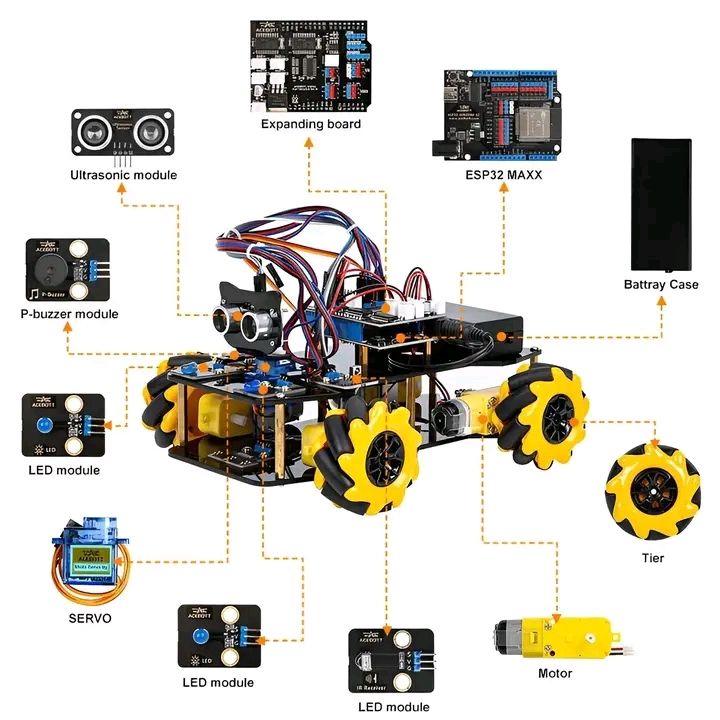
This project is a Smart Mecanum-Wheel Robot Car powered by an ESP32 MAXX board and an expansion module.
The robot includes multiple modules such as:
- Ultrasonic sensor
- Servo motor
- LED modules
- Passive buzzer
- TT gear motors
- Mecanum wheels
The robot can avoid obstacles, rotate in place, flash LEDs, and create buzzer alerts.
2. Components Used
- ESP32 MAXX Controller
- Expansion Shield
- HC-SR04 Ultrasonic Sensor
- SG90 Servo Motor
- TT Gear Motors × 4
- LED Indicator Modules
- Passive Buzzer
- Battery Case
- Mecanum Wheels
- Acrylic Chassis
3. Main Robot Features
- 🔵 Obstacle Avoidance
- 🔄 Mecanum movement (forward, backward, sideways, rotate)
- 🔊 Buzzer alarm when objects are too close
- 💡 LED flashing effects
- 🤖 Servo scanning system for intelligent decision-making
4. Wiring Overview
Simple pin mapping for ESP32:
Ultrasonic Sensor
| Part | ESP32 Pin |
|---|---|
| VCC | 5V |
| Trig | GPIO 26 |
| Echo | GPIO 25 |
| GND | GND |
Servo SG90
- Signal → GPIO 13
- VCC → 5V
- GND → GND
Motors (through driver on expansion board)
| Motor | DIR Pin | PWM Pin |
|---|---|---|
| Motor A | 14 | 27 |
| Motor B | 12 | 33 |
| Motor C | 32 | 15 |
| Motor D | 4 | 2 |
LED Modules
- Front LED → GPIO 5
- Left LED → GPIO 18
- Right LED → GPIO 19
Buzzer
- Signal → GPIO 23
🧠 5. FULL ESP32 CODE (COMPLETE ARDUINO CODE)
Fully working code for obstacle avoidance + servo scan + LED + buzzer.
// ------------------------------------
// SMART ESP32 MECANUM ROBOT CAR
// FULL WORKING ARDUINO CODE
// ------------------------------------

#include <Arduino.h>
#include <Servo.h>

// Motor pins
int MA_DIR = 14, MA_PWM = 27;
int MB_DIR = 12, MB_PWM = 33;
int MC_DIR = 32, MC_PWM = 15;
int MD_DIR = 4,  MD_PWM = 2;

// Ultrasonic pins
int trigPin = 26;
int echoPin = 25;

// Servo
Servo scanServo;
int servoPin = 13;

// LEDs
int LED_Front = 5;
int LED_Left = 18;
int LED_Right = 19;

// Buzzer
int buzzer = 23;

// --- Measure Distance ---
long getDistance() {
  digitalWrite(trigPin, LOW);
  delayMicroseconds(2);
  digitalWrite(trigPin, HIGH);
  delayMicroseconds(10);
  digitalWrite(trigPin, LOW);
  long duration = pulseIn(echoPin, HIGH);
  long distance = duration * 0.034 / 2;
  return distance;
}

// --- Motor Control ---
void motorA(int speed) {
  digitalWrite(MA_DIR, speed >= 0);
  analogWrite(MA_PWM, abs(speed));
}
void motorB(int speed) {
  digitalWrite(MB_DIR, speed >= 0);
  analogWrite(MB_PWM, abs(speed));
}
void motorC(int speed) {
  digitalWrite(MC_DIR, speed >= 0);
  analogWrite(MC_PWM, abs(speed));
}
void motorD(int speed) {
  digitalWrite(MD_DIR, speed >= 0);
  analogWrite(MD_PWM, abs(speed));
}

void forward(int s) {
  motorA(s); motorB(s); motorC(s); motorD(s);
}
void backward(int s) {
  motorA(-s); motorB(-s); motorC(-s); motorD(-s);
}
void stopCar() {
  motorA(0); motorB(0); motorC(0); motorD(0);
}

// ------------------------------------
void setup() {
  Serial.begin(115200);

  pinMode(trigPin, OUTPUT);
  pinMode(echoPin, INPUT);

  pinMode(LED_Front, OUTPUT);
  pinMode(LED_Left, OUTPUT);
  pinMode(LED_Right, OUTPUT);

  pinMode(buzzer, OUTPUT);

  pinMode(MA_DIR, OUTPUT); pinMode(MA_PWM, OUTPUT);
  pinMode(MB_DIR, OUTPUT); pinMode(MB_PWM, OUTPUT);
  pinMode(MC_DIR, OUTPUT); pinMode(MC_PWM, OUTPUT);
  pinMode(MD_DIR, OUTPUT); pinMode(MD_PWM, OUTPUT);

  scanServo.attach(servoPin);

  Serial.println("Robot System Ready");
}

// ------------------------------------
void loop() {

  long dist = getDistance();
  Serial.println(dist);

  // LED Effects
  digitalWrite(LED_Front, HIGH);
  digitalWrite(LED_Left, millis() / 300 % 2);
  digitalWrite(LED_Right, millis() / 400 % 2);

  // Obstacle detection
  if (dist < 15) {
    stopCar();
    tone(buzzer, 600, 200);
    delay(200);

    // Scan Left
    scanServo.write(30);
    delay(400);
    long leftDist = getDistance();

    // Scan Right
    scanServo.write(150);
    delay(400);
    long rightDist = getDistance();

    // Reset center
    scanServo.write(90);

    // Decision making
    if (leftDist > rightDist) {
      backward(150); delay(300);
      // Rotate Left
      motorA(-200); motorB(200); motorC(-200); motorD(200);
      delay(500);
    } else {
      backward(150); delay(300);
      // Rotate Right
      motorA(200); motorB(-200); motorC(200); motorD(-200);
      delay(500);
    }
  }
  else {
    // Move forward safely
    forward(180);
  }
}
🏷️ Tags
#ESP32Robot #MecanumRobot #SmartCar #ArduinoESP32 #RobotProject #UltrasonicRobot #DIYRobotics #STEMRobot #RobotCoding