
📌 Introduction
Smart Home Automation is a system where different electronic devices and sensors connect to a central controller (Arduino UNO).
This allows your home to become automatic, smart, energy-saving, and more secure.
With Arduino, you can control:
- 🌡 Temperature & humidity (DHT11)
- 🚦 Traffic light simulation
- 🚪 Automatic garage door
- 🏢 Mini elevator system
- 🎯 Motion detection (Radar/PIR)
- 💡 Lights automation
- 💦 Water fountain
- ❄ Air conditioner indicator
This project is perfect for students, DIY makers, and STEM learners.
🧩 Components Needed
✔ Arduino UNO
✔ DHT11 Temperature & Humidity Sensor
✔ PIR Motion Sensor or Radar sensor
✔ Servo Motor (Garage / Elevator)
✔ LEDs (Red/Yellow/Green for traffic light)
✔ Relay Module (to control AC indicator or fountain)
✔ Jumper wires
✔ 5V power
Everything in this project uses low voltage (5V) for safety.
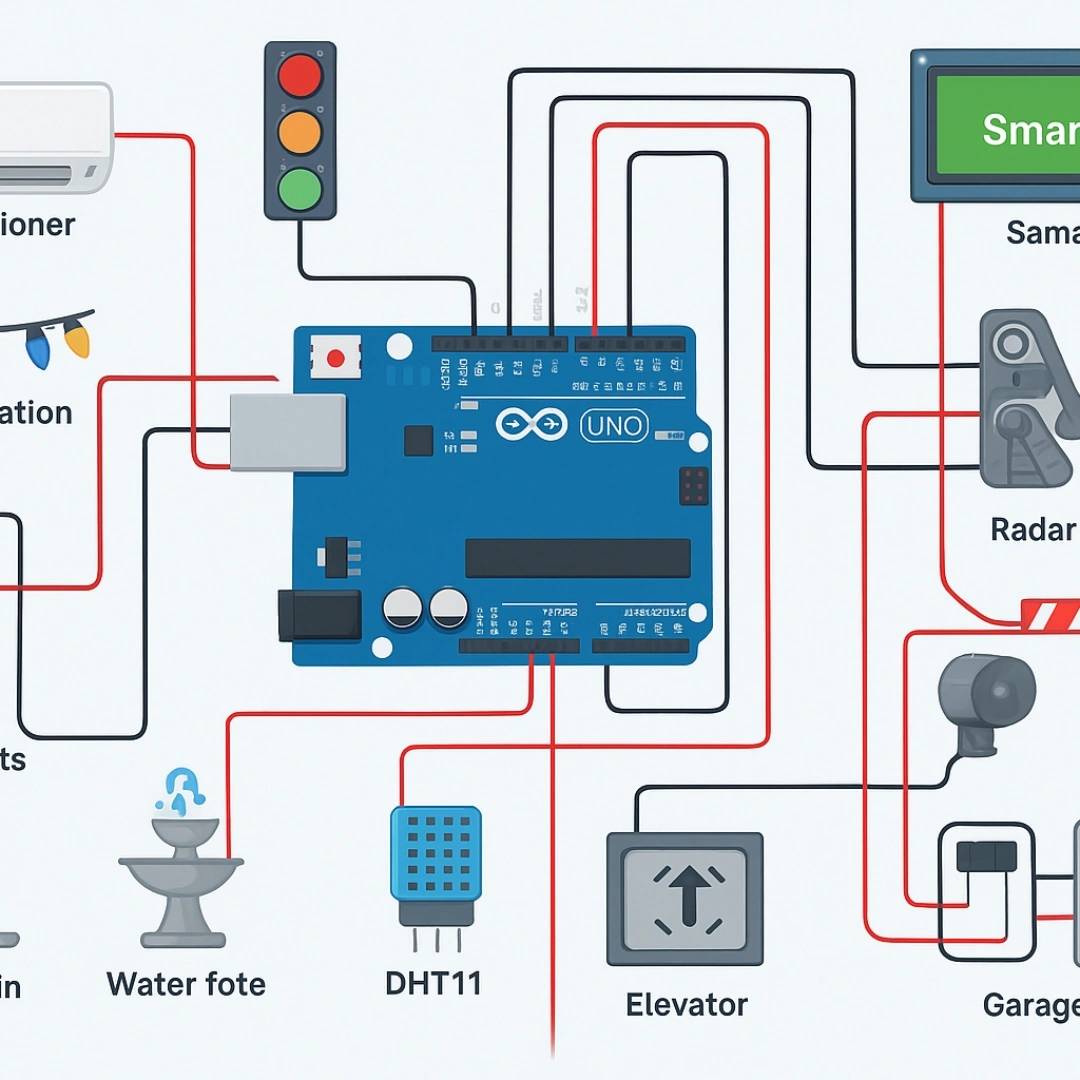
🔌 System Overview From Picture
The system includes:
💡 Lights Automation
Lights turn ON when needed using Arduino control.
❄ Air Conditioner Control (via relay indicator)
Arduino triggers a relay when temperature is high.
🚦 Traffic Light Example
Red, yellow, green LEDs programmed to cycle automatically.
💧 Water Fountain
Controlled by relay based on schedule or button.
🌡 DHT11 Temperature Sensor
Reads room temperature & humidity.
🚪 Garage System
Servo motor or DC motor opens/closes the garage door.
🏢 Elevator Mini System
A small servo simulates elevator up/down movement.
🎯 Radar or PIR Motion
Detects motion and triggers lights or buzzer.
🧾 FULL ARDUINO CODE (All functions combined)
This code includes:
- Traffic light
- Garage door (servo)
- Elevator (servo)
- Motion sensor
- DHT11 temperature & humidity
- Relay control (AC & fountain)
📌 Before uploading: install DHT library
👉 DHT sensor library by Adafruit
#include <DHT.h>
#include <Servo.h>

#define DHTPIN 2
#define DHTTYPE DHT11
DHT dht(DHTPIN, DHTTYPE);

// Traffic Light Pins
int redLED = 3;
int yellowLED = 4;
int greenLED = 5;

// Motion Sensor
int motionPin = 6;

// Relay Outputs
int relayAC = 7;
int relayFountain = 8;

// Garage Door Servo
Servo garageServo;

// Elevator Servo
Servo elevatorServo;

void setup() {
  Serial.begin(9600);

  // Traffic light pins
  pinMode(redLED, OUTPUT);
  pinMode(yellowLED, OUTPUT);
  pinMode(greenLED, OUTPUT);

  // Motion sensor
  pinMode(motionPin, INPUT);

  // Relays
  pinMode(relayAC, OUTPUT);
  pinMode(relayFountain, OUTPUT);

  // Servos
  garageServo.attach(9);
  elevatorServo.attach(10);

  // Initialize
  dht.begin();

  garageServo.write(0);      // Garage closed
  elevatorServo.write(90);   // Elevator idle
}

void loop() {
  // -------------------------
  // 1. TRAFFIC LIGHT SYSTEM
  // -------------------------
  digitalWrite(redLED, HIGH);
  delay(3000);
  digitalWrite(redLED, LOW);

  digitalWrite(yellowLED, HIGH);
  delay(1500);
  digitalWrite(yellowLED, LOW);

  digitalWrite(greenLED, HIGH);
  delay(3000);
  digitalWrite(greenLED, LOW);

  // -------------------------
  // 2. READ TEMP & HUMIDITY
  // -------------------------
  float t = dht.readTemperature();
  float h = dht.readHumidity();

  if (!isnan(t)) {
    Serial.print("Temp: ");
    Serial.print(t);
    Serial.print("   Humidity: ");
    Serial.println(h);
  }

  // AC control (relay)
  if (t > 30) {
    digitalWrite(relayAC, HIGH);   // Turn ON AC indicator
  } else {
    digitalWrite(relayAC, LOW);
  }

  // -------------------------
  // 3. MOTION SENSOR AUTOMATION
  // -------------------------
  int motionDetected = digitalRead(motionPin);

  if (motionDetected == HIGH) {
    Serial.println("Motion Detected!");
    digitalWrite(relayFountain, HIGH);  // Turn fountain ON
  } else {
    digitalWrite(relayFountain, LOW);
  }

  // -------------------------
  // 4. GARAGE DOOR
  // -------------------------
  garageServo.write(0);   // Closed
  delay(2000);
  garageServo.write(90);  // Opening half
  delay(2000);
  garageServo.write(180); // Fully open
  delay(2000);

  // -------------------------
  // 5. MINI ELEVATOR
  // -------------------------
  elevatorServo.write(0);    // Down
  delay(2000);
  elevatorServo.write(180);  // Up
  delay(2000);
}
📌 How the Code Works
✔ Traffic Light
Simulates real traffic system using 3 LEDs.
✔ Temperature Control
If temperature > 30°C → AC relay turns ON.
✔ Motion Sensor
Detects movement → activates water fountain.
✔ Garage Door
Servo moves between 0° and 180°.
✔ Elevator
Servo moves up and down.
🔧 Possible Extensions
- Add LCD display
- Use Bluetooth to control via phone
- Add flame or gas sensor
- Add IR remote control
- Add automatic curtains
If you want, I can generate schematic wiring diagrams, PDF file, or PowerPoint version too.
🏷 Hashtags (English + Khmer)
🔧 Tech & Arduino
#Arduino #ArduinoUNO #SmartHome
#HomeAutomation #IOTProject #ArduinoProject
#ElectronicsDIY #STEMProject #CodingProject
#SmartHouse #DHT11 #PIRSensor
#RelayModule #TrafficLightSystem
🇰🇭 Khmer + English
#ឧបករណ៍អេឡិចត្រូនិក #គម្រោងArduino
#ផ្ទះឆ្លាត #បច្ចេកវិទ្យាកម្ពុជា
#រៀនArduino #សិស្សSTEM
#សម័យឌីជីថល #បង្កើតរ៉ូបូត