
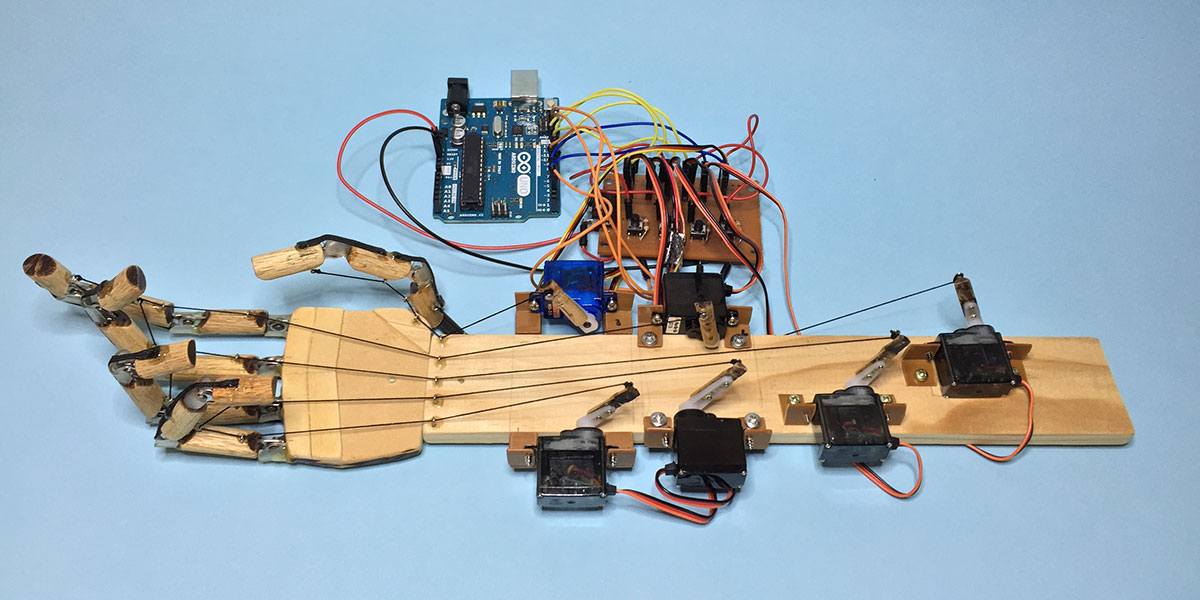
Building a robotic hand is one of the most exciting DIY electronics projects for beginners and hobby makers. This design uses Arduino UNO, multiple servo motors, wooden joints, and fishing line strings to mimic real human finger movements.
This setup works by attaching strings to each finger segment. When the servo motors pull the strings, the fingers bend—simulating natural hand motion. It’s simple, low-cost, and perfect for learning mechanics, robotics, and Arduino programming.
🧰 Materials Needed
- Arduino UNO
- 5–6 Micro servo motors (SG90 / MG90)
- Wooden sticks / popsicle sticks for finger joints
- Small screws & hinges
- Fishing line or nylon string
- Breadboard and jumper wires
- 5V external power supply for servos
- Base wooden board
🛠️ How It Works
- Each finger is made from several wooden segments connected by metal hinges.
- A string runs through the finger and connects to a servo motor at the base.
- When the servo rotates, it pulls the string, causing the finger to bend.
- Releasing the servo tension lets the finger return to its open position.
This creates a very realistic robotic hand movement using only simple materials.
🧪 Arduino Code (5 Finger Control)
#include <Servo.h>

Servo thumb;
Servo indexF;
Servo middleF;
Servo ringF;
Servo pinky;

void setup() {
  thumb.attach(3);
  indexF.attach(5);
  middleF.attach(6);
  ringF.attach(9);
  pinky.attach(10);
}

void loop() {
  // Close fingers
  thumb.write(150);
  indexF.write(150);
  middleF.write(150);
  ringF.write(150);
  pinky.write(150);
  delay(1000);

  // Open fingers
  thumb.write(20);
  indexF.write(20);
  middleF.write(20);
  ringF.write(20);
  pinky.write(20);
  delay(1000);

  // Wave motion example
  indexF.write(150); delay(400);
  indexF.write(20); delay(400);
}
✔️ You can customize:
- Finger speed
- Individual finger gestures
- Add sensors for automatic motion
- Integration with Bluetooth or glove control
✅ FULL DETAILED ARDUINO CODE (Robotic Hand – 5 Servos)
#include <Servo.h>

// Create servo objects for each finger
Servo thumb;
Servo indexF;
Servo middleF;
Servo ringF;
Servo pinky;

// Finger angle limits (adjust depending on your hardware)
int openPos = 20;     // finger fully open
int closePos = 150;   // finger fully closed

// Motion smoothness (lower = slower)
int speedDelay = 10; // 5–20 recommended

// ---------------------------
// Smooth movement function
// ---------------------------
void moveSmooth(Servo &servo, int startAngle, int endAngle) {
  if (startAngle < endAngle) {
    for (int pos = startAngle; pos <= endAngle; pos++) {
      servo.write(pos);
      delay(speedDelay);
    }
  } else {
    for (int pos = startAngle; pos >= endAngle; pos--) {
      servo.write(pos);
      delay(speedDelay);
    }
  }
}

// ---------------------------
// Finger movement functions
// ---------------------------
void fingerOpen(Servo &finger) {
  int current = finger.read();
  moveSmooth(finger, current, openPos);
}

void fingerClose(Servo &finger) {
  int current = finger.read();
  moveSmooth(finger, current, closePos);
}

// ---------------------------
// Hand gestures
// ---------------------------

// Close all fingers
void makeFist() {
  fingerClose(thumb);
  fingerClose(indexF);
  fingerClose(middleF);
  fingerClose(ringF);
  fingerClose(pinky);
  delay(500);
}

// Open all fingers
void openHand() {
  fingerOpen(thumb);
  fingerOpen(indexF);
  fingerOpen(middleF);
  fingerOpen(ringF);
  fingerOpen(pinky);
  delay(500);
}

// Point gesture (index only)
void gesturePoint() {
  fingerClose(middleF);
  fingerClose(ringF);
  fingerClose(pinky);
  fingerClose(thumb);

  fingerOpen(indexF); // index pointing
  delay(800);
}

// Wave gesture (index + middle)
void gestureWave() {
  for (int i = 0; i < 3; i++) {
    moveSmooth(indexF, openPos, closePos);
    moveSmooth(middleF, openPos, closePos);

    moveSmooth(indexF, closePos, openPos);
    moveSmooth(middleF, closePos, openPos);
  }
}

// Thumbs up gesture
void gestureThumbsUp() {
  fingerOpen(thumb);

  fingerClose(indexF);
  fingerClose(middleF);
  fingerClose(ringF);
  fingerClose(pinky);
  delay(1000);
}

// ---------------------------
// INITIAL SETUP
// ---------------------------
void setup() {
  // Attach each servo to Arduino pins
  thumb.attach(3);
  indexF.attach(5);
  middleF.attach(6);
  ringF.attach(9);
  pinky.attach(10);

  // Start with an open hand
  openHand();
}

// ---------------------------
// MAIN LOOP
// ---------------------------
void loop() {
  // Demonstrate gestures in a sequence

  makeFist();
  openHand();

  gesturePoint();
  openHand();

  gestureThumbsUp();
  openHand();

  gestureWave();
  openHand();

  delay(1000);
}
✅ WHAT THIS CODE CAN DO
✔ Smooth finger bending
✔ Open hand & make fist
✔ Human-like gestures
✔ Independent finger motion
✔ Easy to expand for sensors/gloves
🎯 Final Notes
This robotic hand is great for:
- School projects
- Robotics learning
- Smart prosthetic experiments
- Arduino practice
- DIY engineering builds